.svg)
Discover how you can make the most of all our help and support material
Last Updated: 29/01/2025
What is the Resource Centre?
Whether you're exploring a new feature or want to remind yourself about some system processes, the Resource Centre is your go-to place for all your help and support needs. Designed to provide simple and clear guidance, it's packed with helpful content - here’s a quick guide to what’s inside!
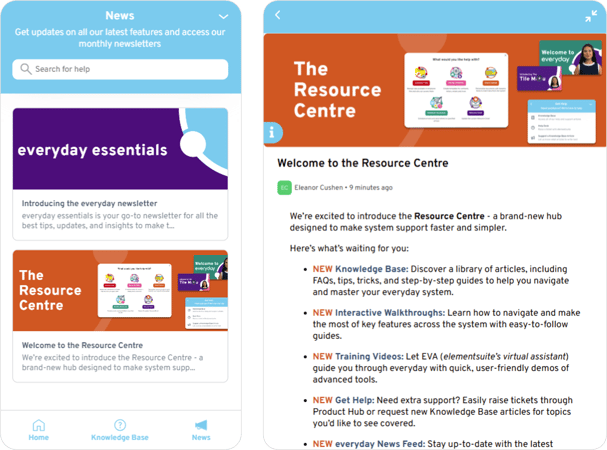
- Home – Onboarding checklists, interactive walkthroughs and training videos
- Knowledge Base – Step-by-step guides, best practices and FAQs
- News Feed – Updates on all the latest features and articles
You can visit the Resource Centre at any time by clicking the ‘i’ icon in the bottom left-hand corner of your screen.

In this article, we’ll explore all the different areas of the Resource Centre so you know exactly where to get the answers you're looking for.
Quick Tip:
Use the Resource Centre’s search feature to quickly find the help and support you need!
Exploring the Home tab
The Home tab is your central hub for getting started and accessing essential training materials. Whether you're new and need structured onboarding or are just looking to sharpen your skills, this section provides the guidance and resources to help you use the system more effectively and efficiently.
Key Features:
- Onboarding Checklists – Stay on track with structured checklists that walk you through the essential steps to familiarise yourself with the system.
- Interactive Walkthroughs – Discover how step-by-step guides can help you use specific features in real-time, ensuring a hands-on learning experience.
- Training Videos – Dive into in-depth video tutorials covering more complex processes, making it easy to follow along at your own pace.
- Get Help – Need further assistance? Use this section to raise support tickets, suggest new knowledge base articles, and get direct access to expert help.
Diving in to the Knowledge Base
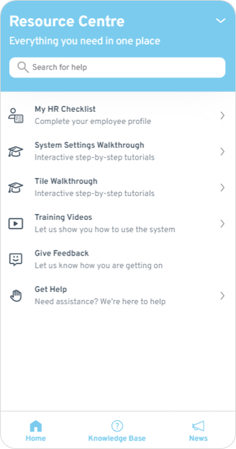
Here in the Knowledge Base, you can find concise, easy-to-navigate articles with best practices and tips to support you along your everyday journey. Whether you need guidance on getting started or advanced features, the Knowledge Base is a great initial touch point for any burning questions or quick fixes.
The Knowledge Base is frequently updated with new articles and is a great resource for learning how to make the most of everyday. Whenever you feel stuck or have a "How do I...?" question, it's the perfect place to seek answers and discover useful product features.
Introducing the News Feed
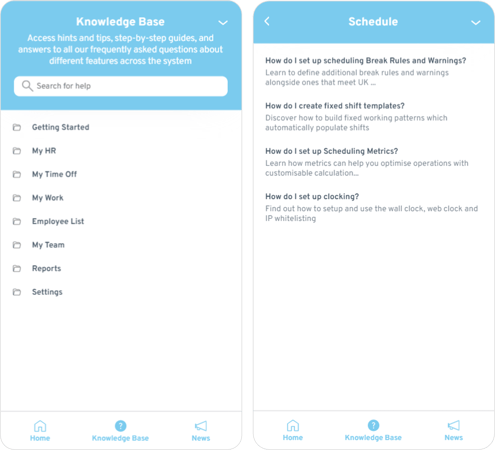
Get updates from the elementsuite team on all the latest features, articles and other exciting news. We will also be posting our monthly newsletter (everyday essentials) for admins to view.